AGENTS.md & Codebase Onboarding
Part 4 / Protocols & StandardsWhat is AGENTS.md?
AGENTS.md is a markdown file that tells AI agents how to work with your project. Humans read README.md to understand a project. Agents read AGENTS.md to understand how to contribute to it. The distinction is important because humans and agents need different information. A human developer needs conceptual explanations, getting-started guides, and architectural overviews. An agent needs precise commands, exact file paths, naming conventions, and explicit constraints.
Over 60,000 open-source projects now have AGENTS.md files. It’s supported by Ona, OpenAI Codex, Google Jules, GitHub Copilot, Cursor, Windsurf, Devin, VS Code, and many more. The standard was donated by OpenAI to the Agentic AI Foundation, making it the de facto standard for codebase-to-agent communication.
The impact of a well-written AGENTS.md is measurable. Projects that adopted AGENTS.md early report 30-50% higher first-attempt success rates for agent-generated code, fewer convention violations, and fewer failed builds. The reason is simple: without AGENTS.md, the agent has to infer your project’s conventions from the code itself, which is error-prone. With AGENTS.md, the conventions are explicit, and the agent follows them.
Anatomy of a good AGENTS.md
A well-structured AGENTS.md includes these sections:
Header: Project overview and tech stack
Quick Start: Install, dev, test, and build commands (e.g.,
pnpm install, pnpm dev, pnpm test, pnpm build)
Architecture: Directory structure with purpose annotations
Code Conventions: - TypeScript strict mode, no any types -
Single quotes, no semicolons (enforced by ESLint) - Functional patterns
preferred over classes - All functions must have JSDoc comments - Error
handling: use Result<T, E> pattern, not try/catch
Testing Requirements: - All PRs must pass CI (GitHub Actions) - New features require unit tests (Vitest) - API changes require integration tests - Minimum 80% code coverage for new files
Security Notes: - NEVER modify files in /config/secrets/ -
NEVER commit .env files - All API calls must go through the gateway -
Database queries must use parameterized queries
Common Patterns: Step-by-step instructions for recurring tasks (adding endpoints, running migrations, etc.)
Known Issues: Gotchas that agents should be aware of (platform-specific bugs, timeout workarounds, etc.)
AGENTS.md vs. other context files
| File | Purpose | Audience |
|---|---|---|
| README.md | Project overview, setup instructions | Human developers |
| AGENTS.md | Agent-specific instructions, conventions | AI agents |
| CONTRIBUTING.md | Contribution guidelines | Human contributors |
| .cursorrules | Cursor-specific instructions | Cursor IDE |
| .clinerules | Cline-specific instructions | Cline extension |
| CLAUDE.md | Claude Code-specific instructions | Claude Code |
The problem is fragmentation. Every tool has its own context file format. If you maintain all of them, you’re duplicating information across five or six files. If you maintain only one, agents using other tools don’t get the context they need.
AGENTS.md aims to be the universal standard. If you can only maintain one file, maintain AGENTS.md. Most modern coding agents - including Ona, Claude Code, Cursor, Copilot, and Windsurf - read AGENTS.md. Some also read their tool-specific files (.cursorrules, CLAUDE.md), but AGENTS.md provides the broadest coverage.
Writing effective AGENTS.md
The difference between a good AGENTS.md and a bad one is the difference between an agent that produces useful output on the first try and an agent that requires three rounds of corrections. Here are the patterns that matter.
Be specific, not general. “Follow good coding practices” is useless. “Use camelCase for variables, PascalCase for types, SCREAMING_SNAKE_CASE for constants. All functions must have JSDoc comments. Error handling uses Result<T, E> pattern, not try/catch.” is actionable. Agents follow instructions literally - vague instructions produce vague output.
Include negative instructions. Tell the agent what NOT to do. “Never use any types in TypeScript.” “Never modify files in the /config/secrets/ directory.” “Never commit .env files.” “Never use console.log for error handling - use the logger service.” Negative instructions prevent the most common agent mistakes.
Provide examples of common tasks. “To add a new API endpoint:
- Create a route handler in src/api/[resource].ts. 2. Create a service in src/services/[resource].ts. 3. Register the route in src/api/index.ts. 4. Write tests in tests/api/[resource].test.ts. 5. Update the OpenAPI spec.” Step-by-step instructions for recurring tasks dramatically improve agent output quality.
Keep it current. An outdated AGENTS.md is worse than no AGENTS.md - it gives the agent incorrect information that it follows confidently. Review and update AGENTS.md at least monthly, and update it immediately when conventions change. Add a “last updated” date at the top so reviewers can see when it was last maintained.
Test it. Run an agent task using only the information in AGENTS.md. If the agent produces incorrect output, the AGENTS.md is missing information. Add the missing information and test again. Iterate until the agent can complete common tasks correctly on the first try.
Context files for monorepos
Large monorepos need hierarchical context. A monorepo with 50 packages can’t have a single AGENTS.md that covers everything - it would be too long, too generic, and too hard to maintain. Instead, use a hierarchical structure: a root AGENTS.md with organization-wide conventions, and package-level AGENTS.md files with package-specific instructions.
The root AGENTS.md should cover the things that are consistent across the entire monorepo: the programming language and version, the package manager and its commands, the CI/CD pipeline and how to trigger it, the testing framework and conventions, the code review process, and the security policies. It should also include a directory map that tells the agent which packages exist and what they do.
Package-level AGENTS.md files should cover the things that are specific to each package: the package’s purpose and architecture, its dependencies and how they’re managed, its specific conventions (if they differ from the root), its testing requirements, and its known issues. The package-level file should reference the root file (“see root AGENTS.md for organization-wide conventions”) rather than duplicating its content.
Agents should read the root AGENTS.md first, then the package-specific one for the area they’re working in. Most agent frameworks support this automatically - they look for AGENTS.md in the current directory and walk up the directory tree to find parent AGENTS.md files. If your framework doesn’t support this, you can concatenate the files in your agent’s system prompt.
Maintaining AGENTS.md at scale
The biggest challenge with AGENTS.md isn’t writing it - it’s keeping it current. In a fast-moving codebase, conventions change, dependencies are updated, and new patterns emerge. An AGENTS.md that was accurate three months ago may be misleading today.
Three practices help maintain AGENTS.md at scale. First, make AGENTS.md updates part of your PR process. When a PR changes a convention (new error handling pattern, new testing approach, new directory structure), the PR should also update AGENTS.md. This is the same discipline as updating documentation - it’s easy to skip, but the cost of skipping compounds over time.
Second, run automated consistency checks. A CI job can verify that the commands in AGENTS.md actually work (does “npm test” succeed?), that the directory structure described in AGENTS.md matches the actual directory structure, and that the conventions described in AGENTS.md are consistent with the linting configuration. These checks catch drift before it causes agent failures.
Third, review AGENTS.md quarterly. Set a calendar reminder to read through the file, verify that everything is still accurate, and update anything that’s changed. This is a 30-minute investment that prevents weeks of debugging agent failures caused by outdated instructions.
Measuring AGENTS.md effectiveness
How do you know if your AGENTS.md is working?
| Metric | How to Measure | Good Target |
|---|---|---|
| Agent first-attempt success rate | % of tasks completed without human correction | > 70% |
| Convention violations | Lint errors in agent-generated code | < 5% of lines |
| Test pass rate | % of agent-generated code that passes tests | > 90% |
| Review comments per PR | Average human review comments on agent PRs | < 3 |
| Time to first useful output | How long before the agent produces something usable | < 5 minutes |
If your agent consistently violates conventions or fails tests, your AGENTS.md needs improvement.
Related Concepts: Context Engineering (5.1), Codebase Knowledge Graph (6.5) Related Workflows: Onboarding Agents to Your Codebase (Chapter 23)
GitHub agentic workflows
In February 2026, GitHub announced Agentic Workflows - automated, intent-driven repository workflows that run in GitHub Actions, authored in plain Markdown and executed with coding agents. This standardizes how agents interact with repositories at the platform level.
Agentic Workflows represent a significant shift in how we think about CI/CD. Traditional CI/CD pipelines are imperative - they specify exact steps (run this command, check this condition, deploy to this environment). Agentic Workflows are declarative - they specify intent (triage this issue, fix this CI failure, update this documentation) and let the agent figure out the implementation.
What Agentic Workflows do: Automatically triage and label issues based on content analysis. Generate pull requests for documentation updates when code changes. Investigate CI failures and propose fixes. Run code quality improvements on a schedule. Respond to security advisories by patching affected dependencies. Generate release notes from merged PRs.
How they work: Agentic Workflows are defined in Markdown files that describe intent, not implementation. The workflow specifies a trigger (on issue creation, on CI failure, on schedule), a goal (triage the issue, fix the failure, update the docs), and constraints (only modify files in these directories, don’t change public APIs, require human approval before merging). The agent reads the workflow definition, reads the AGENTS.md for codebase context, and executes the task.
Relationship to AGENTS.md: AGENTS.md tells agents about your codebase - the structure, conventions, and constraints. GitHub Agentic Workflows tell agents what to do with your codebase - the tasks, triggers, and goals. They’re complementary:
| AGENTS.md | Agentic Workflows | |
|---|---|---|
| Purpose | Codebase context for agents | Task automation with agents |
| Format | Markdown (descriptive) | Markdown (prescriptive) |
| Scope | ”Here’s how our code works" | "Here’s what to do with our code” |
| Trigger | Agent reads on startup | Events trigger execution |
The combination of AGENTS.md and Agentic Workflows creates a powerful automation layer. AGENTS.md ensures the agent understands your codebase. Agentic Workflows ensure the agent knows what to do. Together, they enable a level of repository automation that wasn’t possible before - not just running scripts, but making intelligent decisions about code.
The AGENTS.md ecosystem
The AGENTS.md standard has spawned an ecosystem of tools and practices that extend its utility beyond simple codebase documentation.
Hierarchical AGENTS.md for monorepos uses a root-level AGENTS.md for organization-wide conventions and package-level AGENTS.md files for package-specific instructions. Agents read the root file first, then the package-specific file for the area they’re working in. This prevents duplication while allowing packages to have their own conventions.
Dynamic AGENTS.md generation tools automatically create and update AGENTS.md files based on your codebase. They analyze your code structure, extract conventions from your linting configuration, identify common patterns from your git history, and generate an AGENTS.md that reflects your actual practices rather than your aspirational ones. This is useful for large codebases where manually maintaining AGENTS.md is impractical.
AGENTS.md validation tools check that your AGENTS.md is consistent with your actual codebase. If your AGENTS.md says “we use the Result pattern for error handling” but your code uses try/catch, the validator flags the inconsistency. This prevents the most common AGENTS.md failure mode - outdated instructions that lead agents astray.
Agent skills: Reusable procedural knowledge
AGENTS.md tells an agent how your codebase works. Skills tell an agent how to do things it has never seen before. The distinction matters: AGENTS.md is project-specific context, while skills are portable capabilities that travel across projects and teams.
A skill is a markdown file that encodes procedural knowledge - step-by-step workflows, best practices, anti-patterns, and domain expertise - in a format that agents can read and follow. Where AGENTS.md says “here are our conventions,” a skill says “here is how to do X well, regardless of which project you’re in.”
The concept emerged from a practical observation: engineers kept solving the same problems across different codebases. Logging best practices, React component patterns, database migration workflows, security audit checklists - this knowledge existed in blog posts, documentation, and engineers’ heads, but agents couldn’t access it systematically. Skills formalize that knowledge into something agents can consume.
The skills ecosystem
The open-source skills ecosystem (skills.sh, maintained by Vercel Labs) has grown rapidly. By early 2026, over 79,000 skills are listed in the registry, covering everything from frontend design patterns to infrastructure automation. Major contributors include Vercel, Anthropic, Microsoft, Google, Expo, and individual developers who package their domain expertise as installable skills.
Skills are installed with a single command (npx skills add owner/repo)
and work across over 37 coding agents - Claude Code, GitHub Copilot,
Cursor, Windsurf, Cline, Codex, Goose, Gemini CLI, and others. The
cross-agent compatibility is the key differentiator from tool-specific
configuration files. A skill written once works everywhere.
The leaderboard reveals what engineers actually need help with. The most-installed skills are not exotic capabilities - they are foundational practices: React best practices (177K installs), web design guidelines (136K), frontend design patterns (109K), and Remotion best practices (117K). The demand is for codified expertise, not novel features.
Skills vs. AGENTS.md vs. MCP
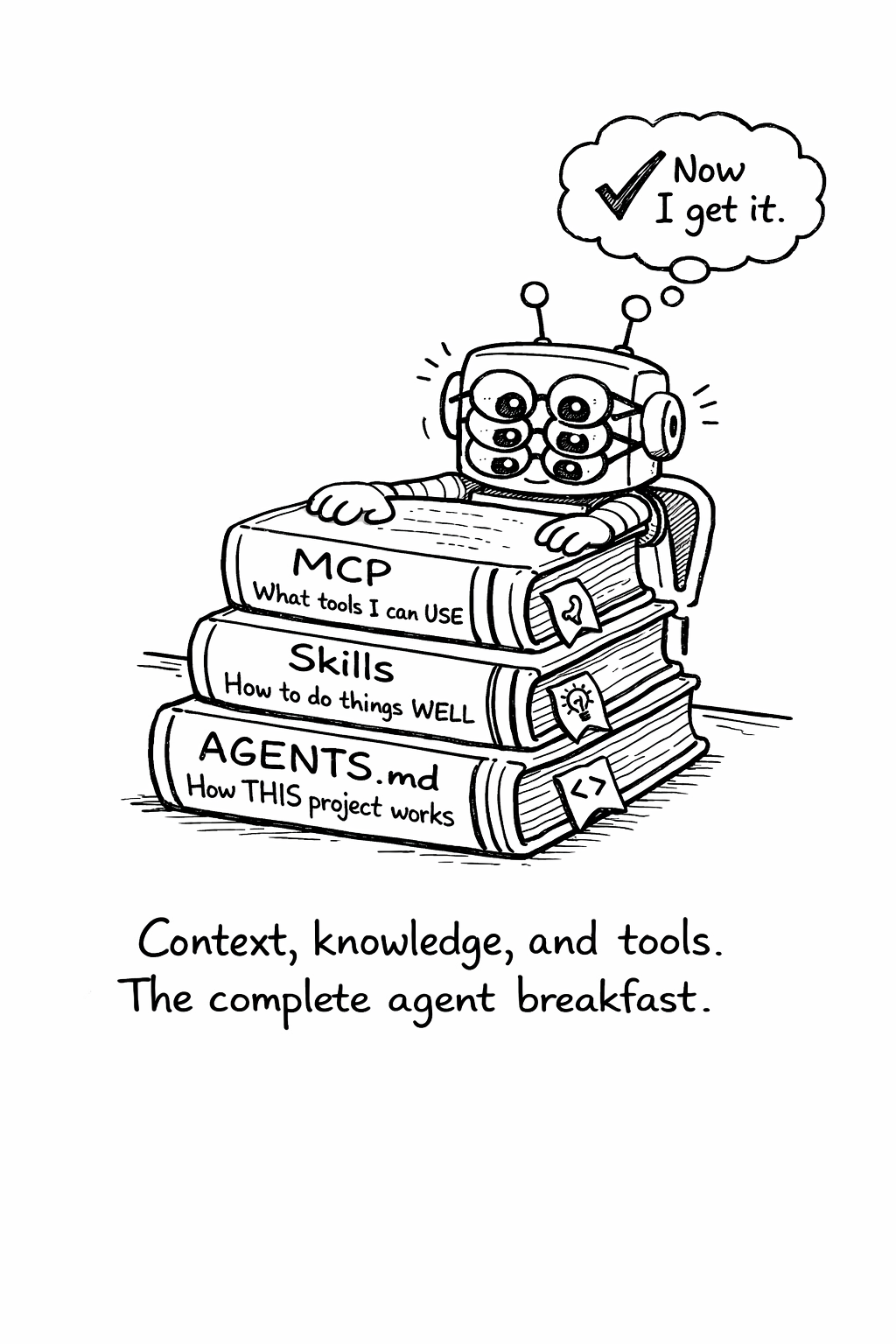
These three concepts occupy different layers of the agent knowledge stack:
| Layer | Mechanism | Scope | Example |
|---|---|---|---|
| Project context | AGENTS.md | One codebase | ”Use camelCase, run pnpm test” |
| Procedural knowledge | Skills | Cross-project | ”How to write good logs” |
| Tool access | MCP | Runtime capabilities | ”Read this database, call this API” |
AGENTS.md provides the “where” - the specific conventions and structure of your project. Skills provide the “how” - the domain expertise for doing things well. MCP provides the “what” - the tools and data sources the agent can access at runtime. A well-configured agent has all three.
Anatomy of a skill
A skill is a directory containing a SKILL.md file, hosted in a Git
repository. The SKILL.md file uses YAML frontmatter with a name and
description, followed by markdown instructions. The structure follows
a consistent pattern:
Frontmatter: YAML metadata with name (unique identifier) and
description (when to use this skill). This is how agents discover and
select skills.
Workflow: Step-by-step instructions the agent follows. This is the core of the skill - explicit, ordered procedures rather than general advice.
Examples: Concrete before/after examples showing correct application.
Anti-patterns: What NOT to do. Like negative instructions in AGENTS.md, these prevent common mistakes.
The best skills are opinionated. A skill that says “consider your logging strategy” is useless. A skill that says “emit one wide event per request per service, with these 15 fields minimum, using this middleware pattern” is actionable. Agents follow instructions literally - vague skills produce vague output.
Logging best practices: What a good skill looks like
To make skills concrete, consider what a logging best practices skill would contain. The source material exists: Boris Tane’s loggingsucks.com (December 2025) identifies why traditional logging fails and prescribes wide events (also called canonical log lines, a term popularized by Stripe) as the fix. Tane led the Workers observability team at Cloudflare and founded Baselime, an observability startup acquired by Cloudflare - he has production credibility on this topic.
The core insight: most codebases emit dozens of narrow log lines per request, each containing a fragment of context. When something breaks, engineers grep through thousands of lines trying to reconstruct what happened. A logging skill would teach agents to emit one wide event per request per service - a single structured record containing all relevant context (user identity, business data, feature flags, timing, error details).
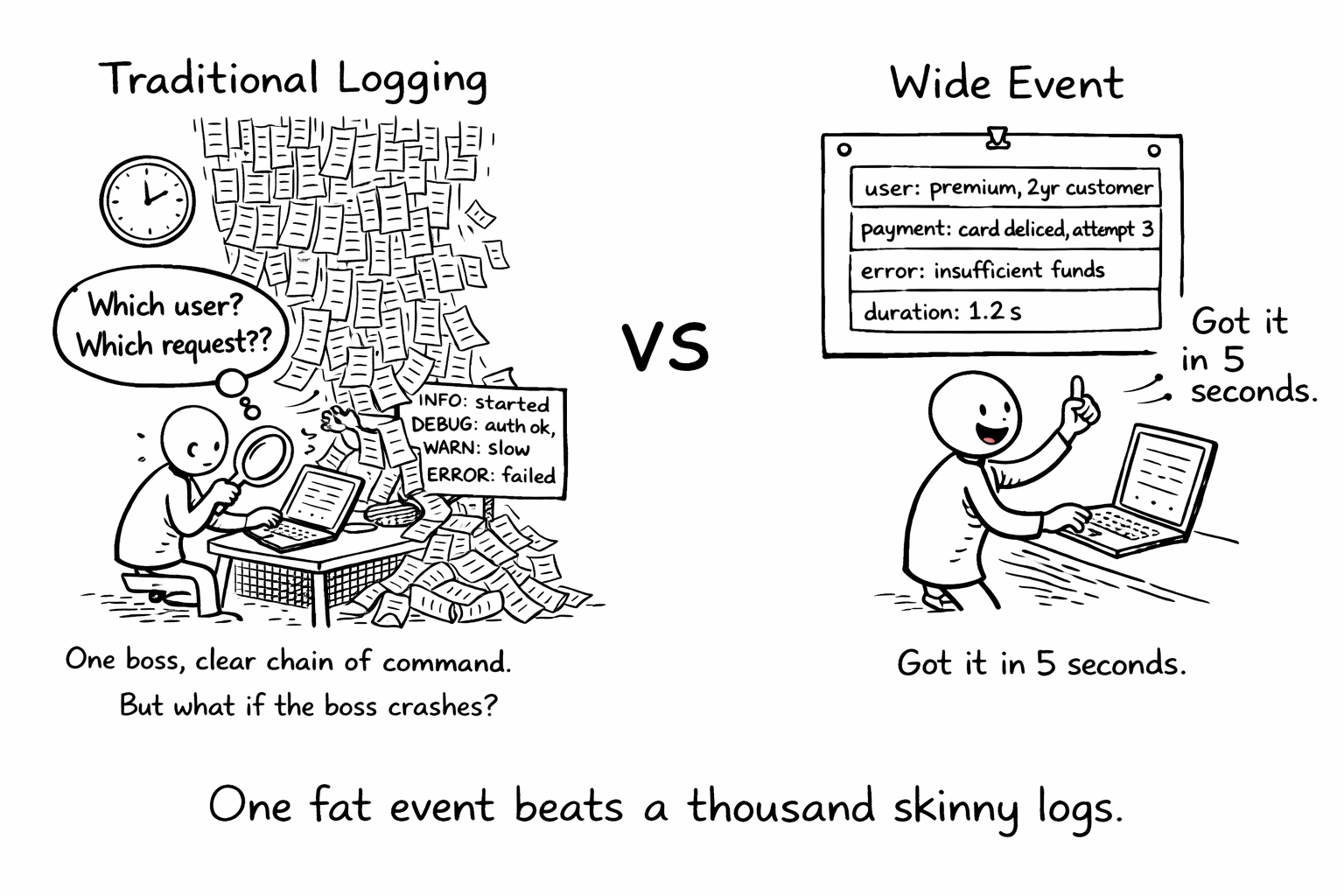
With such a skill installed, agents writing new endpoints or refactoring existing ones would automatically apply the wide event pattern - adding business context to log events, implementing tail sampling to control costs, and structuring logs for queryability rather than readability. The debugging improvement comes not from smarter agents but from fundamentally better logging patterns.
This illustrates the leverage of skills: one engineer’s hard-won expertise, encoded once, applied consistently across every project that uses it. The knowledge doesn’t have to live in a blog post that engineers may or may not read - it becomes part of the agent’s operating procedure.
Writing effective skills
The principles for writing good skills mirror the principles for writing good AGENTS.md, with one addition: skills must be self-contained. An AGENTS.md can reference files in the project (“see src/config for database setup”). A skill cannot - it must carry all the knowledge it needs within itself.
Be prescriptive, not descriptive. “Logging is important for debugging” is a description. “Emit one structured JSON event per request with these fields: request_id, user_id, duration_ms, status_code, error_type, error_message” is a prescription. Skills should read like recipes, not essays.
Include anti-patterns with explanations. “Don’t use console.log for production logging” is good. “Don’t use console.log for production logging - it produces unstructured strings that can’t be queried, lacks automatic context enrichment, and doesn’t support log levels or sampling” is better. The explanation helps the agent make correct decisions in edge cases.
Scope narrowly. A skill that tries to cover “all of backend development” will be too vague to be useful. A skill that covers “structured logging with wide events in Node.js” is specific enough to produce consistent, high-quality output. Narrow skills compose better than broad ones.
Version your knowledge. Skills encode a point-in-time understanding. When best practices evolve, update the skill. Include a “last updated” note so users know whether the advice is current.
Security considerations for skills
Skills are executable knowledge - they instruct agents to modify code, create files, and change configurations. This creates a trust problem similar to package management: how do you know a skill is safe?
The skills.sh ecosystem runs routine security audits on listed skills, but the ecosystem is open and cannot guarantee the safety of every contribution. Before installing a skill, review its contents. A malicious skill could instruct an agent to exfiltrate environment variables, introduce backdoors, or weaken security configurations.
The same principle of least privilege that applies to agent tool access (Chapter 8) applies to skills: only install skills from trusted sources, review their contents before installation, and monitor what agents do after a new skill is added. Organizations should maintain an approved skills list, similar to an approved package registry, and restrict agents to skills on that list.
Skills in enterprise environments
For enterprise teams, skills solve a specific organizational problem: how do you scale engineering expertise across hundreds of developers and dozens of repositories? Senior engineers’ knowledge about logging, testing, security, and architecture typically spreads through code reviews, pair programming, and tribal knowledge. Skills formalize that transfer.
An organization can maintain internal skills repositories that encode their specific practices - not just “how to write good tests” but “how to write tests that work with our CI pipeline, our test data management system, and our coverage requirements.” These internal skills complement public ones from the ecosystem and project-specific AGENTS.md files.
The combination of AGENTS.md (project context), skills (procedural knowledge), and MCP (tool access) creates a complete knowledge stack for agents. Teams that invest in all three layers should expect higher first-attempt success rates and lower review burden on human engineers - each layer addresses a different failure mode, and gaps in any layer force the agent to guess.
Related Concepts: AGENTS.md (13.1), Context Engineering (5.1), MCP (Chapter 11) Related Workflows: Onboarding Agents to Your Codebase (Chapter 23), Security Checklist (Chapter 24)
“When an agent fails, teams ask ‘What happened?’ and have no good answer.”
Agent observability is different from application observability. You’re not just tracking requests and responses - you’re tracking decisions, tool calls, permission checks, token usage, and cost. This section covers how to instrument, monitor, and debug agent systems.